See what breaks when a million people use your design.
Drag servers, databases and queues onto a board, wire them up and set how many people use it each day. Every part shows how busy it gets, and anything that turns red comes with a fix to try.

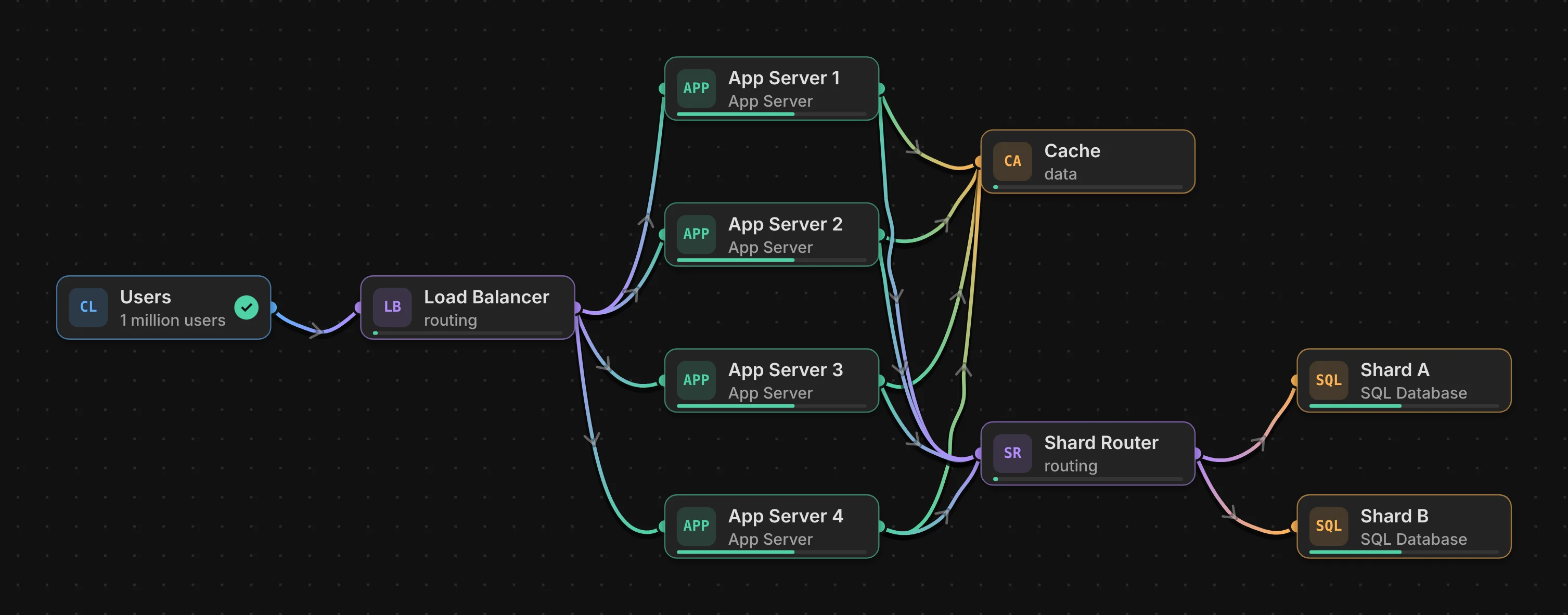
A load balancer shares people across four servers, a cache answers most reads, and a shard router splits the data over two databases.
How it works
- Pick a board. Start from a lesson, a classic system or a blank board, and drag in what you need.
- Set the traffic. Choose how many people use it each day, from 10 to 10 million, and try the worst day: a rush with three times the usual traffic.
- Fix what turns red. Click anything busy and open Fix to see what to try, with a link to the board that explains it.
Two ways in
Foundations
Follow Marmita, a lunch-ordering app in Lisbon, from its first server to millions of users. Each story answers one question.
- Do we need more than one server yet?
- How do we handle more users?
- How do we stay up when something breaks?
- How do we keep the database from becoming the bottleneck?
- How do we keep slow work from slowing users down?
- How do we keep it easy to change?
- How do we keep costs under control?
- How do we know it's working?
Templates
Classic designs, the kind interviews ask about, each with the problem, why the design works and what to remember.
Who it's for
People learning system design, and engineers warming up before an interview. It's free, needs no account and runs in your browser. The numbers are rough on purpose: they show which part runs out of room first, not how many servers to buy.
Best on a laptop or desktop: the board needs a mouse or trackpad.